Get Ad-Free YouTube on Android Using Morphe with Extra Features You Won't Even Find in YouTube Premium
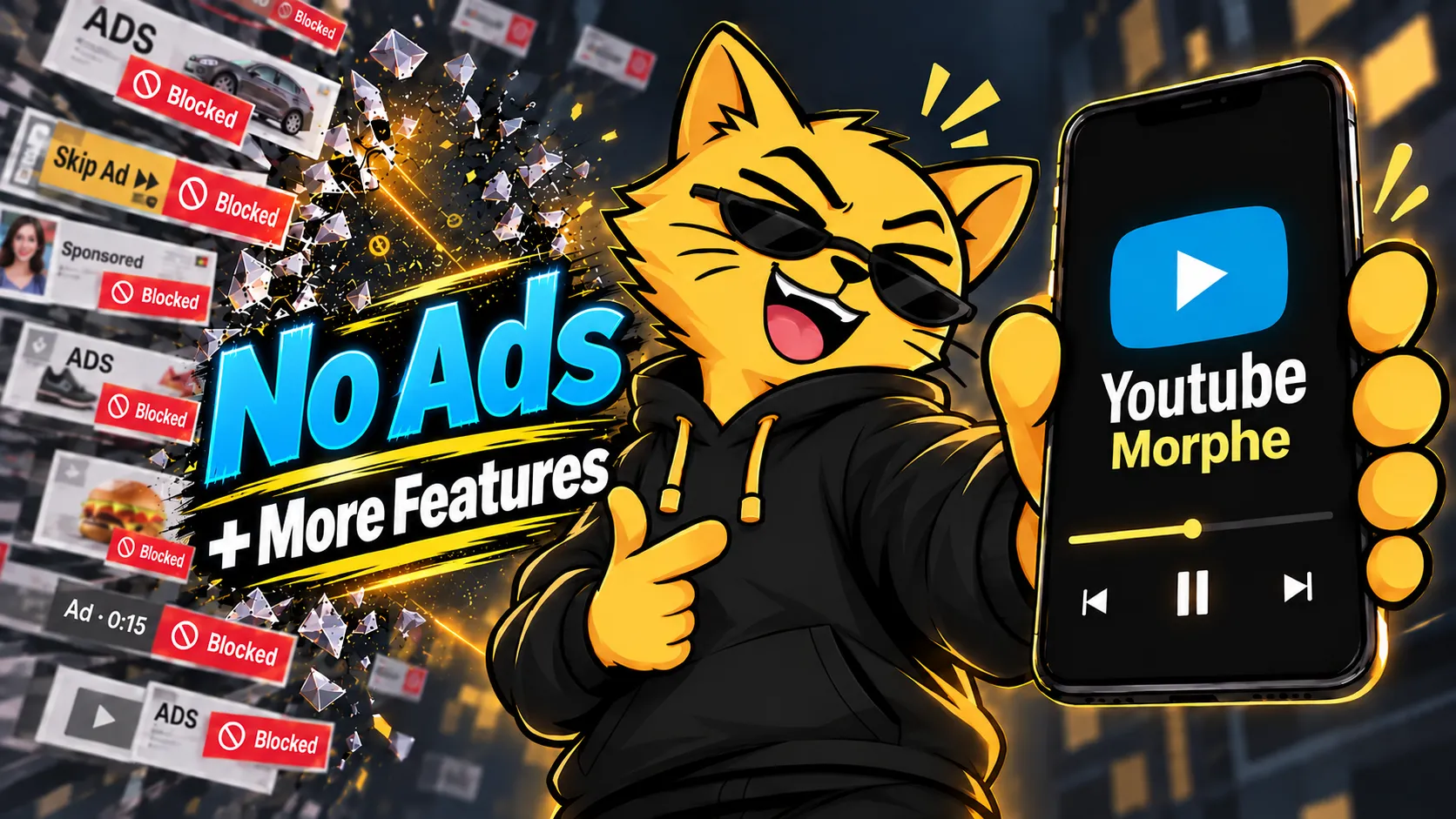
Using stock YouTube these days has gotten ridiculous. You get two unskippable ads before a video even starts, another ad break every three or four minutes, and creators pausing mid-sentence to read out VPN promos. If you just want clean video playback, background audio, and no interruptions, you don’t actually have to pay for YouTube Premium.
That is where Morphe comes in.
I have been using it on my Samsung Galaxy A55 for the past six months. No ads anywhere, audio keeps playing with the screen locked in my pocket, sponsored segments skip automatically, and the dislike counter is back.
If you have never installed an APK before and the word “patching” sounds like a computer science exam, don’t worry. You do not need root access, you do not need a computer, and the whole setup takes about five minutes.
What Are Morphe and MicroG-RE, and Are They Safe?
Before downloading anything, here is a quick look at what these two tools actually do:
- Morphe: A free, open-source tool that modifies the official YouTube app directly on your phone. It is not a pre-hacked app from a sketchy site; it is a utility that applies patches locally to a clean YouTube installer.
- MicroG-RE: A lightweight, open-source companion tool. Because Morphe modifies the app, standard Google Play Services will not recognize its signature. MicroG-RE acts as the bridge between your patched YouTube app and Google servers so you can sign in to your account and keep your playlists, subscriptions, and watch history in sync.
Why they are safe to use:
- Completely Open Source: Both Morphe and MicroG-RE have their complete source code publicly visible on GitHub. Anyone can inspect it, and there are no hidden trackers, spyware, or background miners.
- You Use the Official YouTube File: You are not downloading someone else’s pre-modified file. You download the genuine, untouched YouTube APK directly from APKMirror, and Morphe patches it right on your phone.
- Everything Runs on Your Device: Morphe modifies the app locally without sending your files anywhere. When you log in, MicroG connects straight to official Google servers.
- No Root or System Hacking: You do not need to root your phone or unlock your bootloader. Both apps install just like any regular Android app and can be uninstalled anytime.
Features You Get
Here is what you get once everything is set up:
1. YouTube Premium Features (For Free)
- Zero Video Ads: No pre-roll ads, no mid-roll interruptions, and no banner ads in your feed.
- Background Audio Playback: Lock your screen or switch apps. The audio keeps playing without pause.
- Picture-in-Picture (PiP): Videos shrink into a movable floating mini-player when you leave the app.
2. Extra Features Not Even in YouTube Premium
- SponsorBlock: Automatically skips paid sponsor segments, intro sequences, and reminder nags within the video itself so you never have to manually scrub through them.
- Return YouTube Dislike: Restores the public dislike counter under videos, helping you spot clickbait or bad tutorials before wasting time.
- Pure AMOLED Black Theme: Replaces YouTube’s default dark grey background with true pitch-black, which looks cleaner and saves battery on OLED screens.
- Direct Video & Audio Downloads: Integrates with open-source download tools like NewPipe or Seal to save MP4 and MP3 files straight to your gallery.
- Player Enhancements: Set custom playback speeds, lock your default video resolution, and swipe up/down on the screen to adjust volume and brightness.
- Hide Shorts: If you find YouTube Shorts distracting, you can turn off the Shorts tab and remove the Shorts shelf from your feed completely.
- Clean Shared URLs: Automatically strips out tracking parameters (
?si=...) whenever you share a video link. - Customizable Interface: Hide clutter buttons, adjust navbar icons, and tweak interface settings to your liking.
💡 Quick Note: What is an APK file?
An APK (Android Package Kit) is simply the installation file for an Android app, just like a.exeinstaller on Windows. When you download an app from Google Play, Android installs an APK behind the scenes. Here, we download the official YouTube APK directly so Morphe can patch it before installation.
Quick Overview: What We’re Going To Do
Here is the quick 6-step roadmap of what we are doing:
- Download and Install Morphe Manager: The tool that modifies the YouTube app directly on your phone.
- Download the Official YouTube APK File for Patching: Why an APK file and not the Play Store? The Play Store version is locked in Android’s protected system storage where outside apps cannot touch it. Downloading the standalone APK file lets Morphe unpack, patch, and rebuild it.
- Patch the Downloaded YouTube APK File Inside Morphe App: Morphe modifies the APK locally to strip out ads and add features like SponsorBlock directly on your device.
- Install the Patched YouTube App on Your Phone: Install and open your new ad-free YouTube app.
- Install MicroG-RE & Sign In: The companion tool that connects your modified app to Google servers so you can sign in and sync your subscriptions, playlists, and history.
- Morphe Settings & Customizations: Configure extra tweaks like SponsorBlock, AMOLED dark theme, and the dislike counter.
Step-by-Step Installation Guide
Step 1: Download and Install Morphe Manager
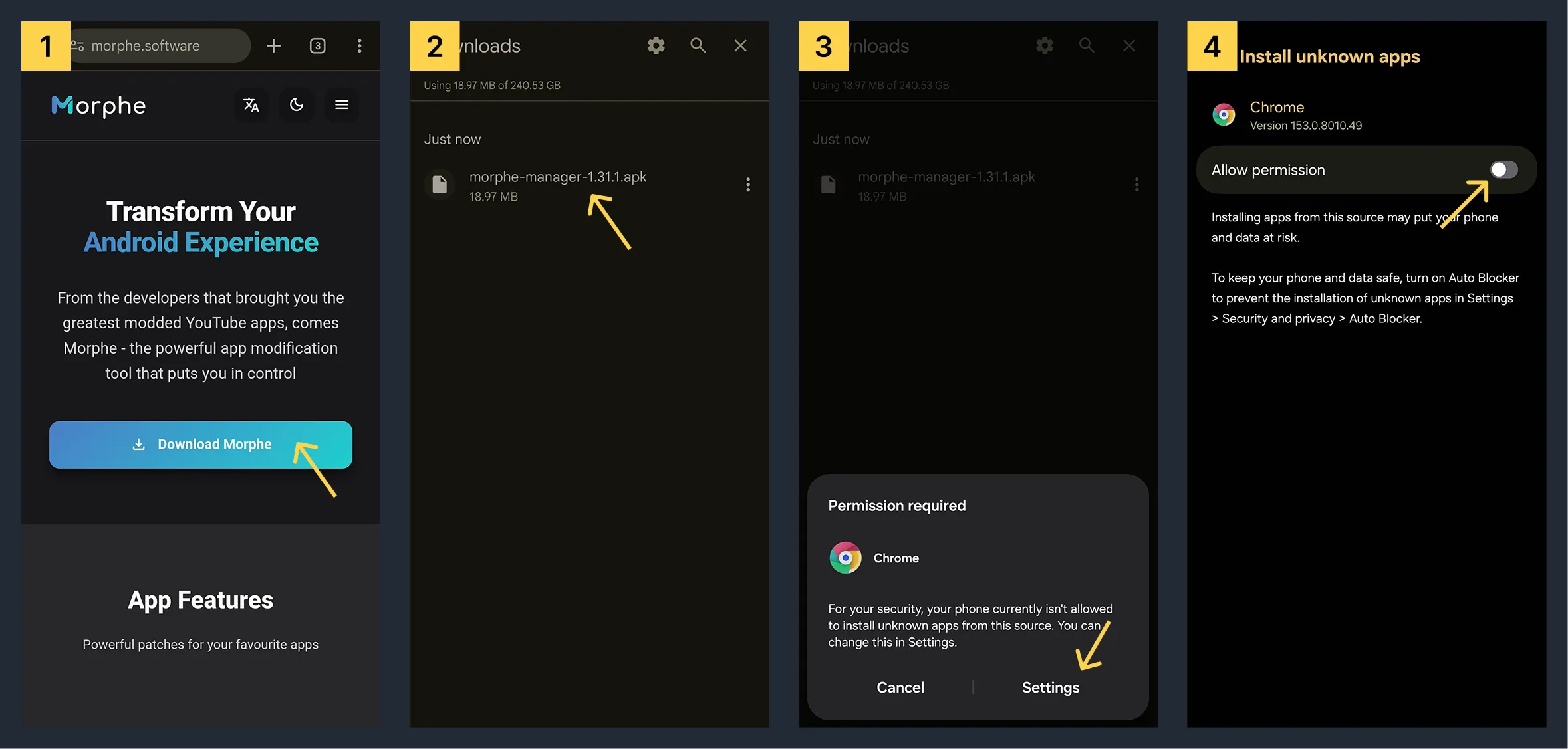
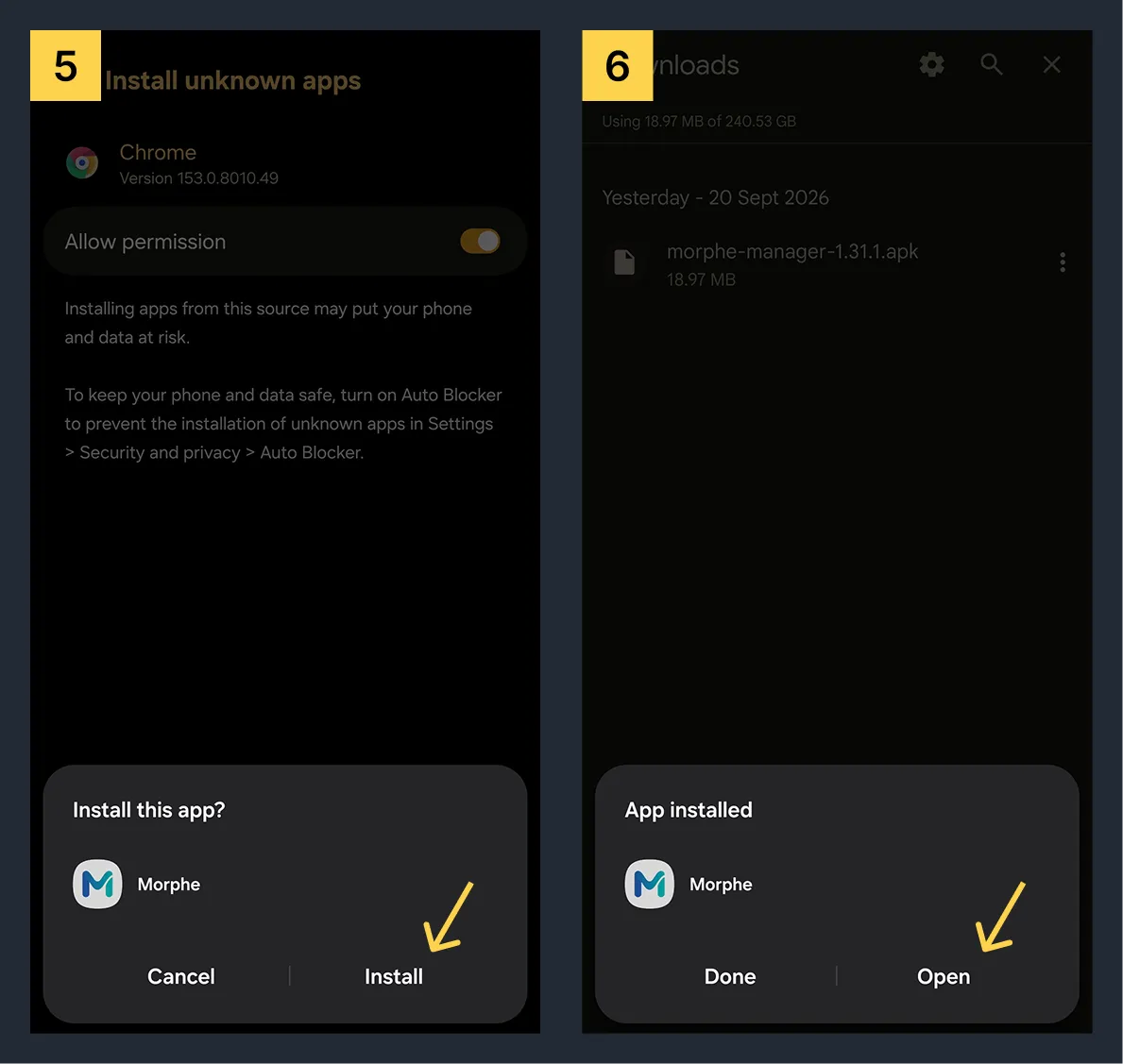
We start by installing Morphe Manager on your phone.
- Open Chrome (or your preferred browser) on your phone and head to the official Morphe homepage at morphe.software (or check their GitHub Releases).
- Tap the blue Download Morphe button. This will download the latest
morphe-manager-x.x.x.apk. - Tap Open or tap the file in your browser’s Downloads page to install the app.
- The Security Prompt: Android will show a prompt saying “For your security, your phone is not allowed to install unknown apps from this source.” Don’t worry, this is standard for any file downloaded outside Google Play. Tap Settings, turn on the “Allow Permission” toggle, and tap “Install” on the next pop-up.
- Once installed, click the “Open” on the pop-up.
You are now on the Morphe Manager home screen.
Step 2: Download the Official YouTube APK File for Patching
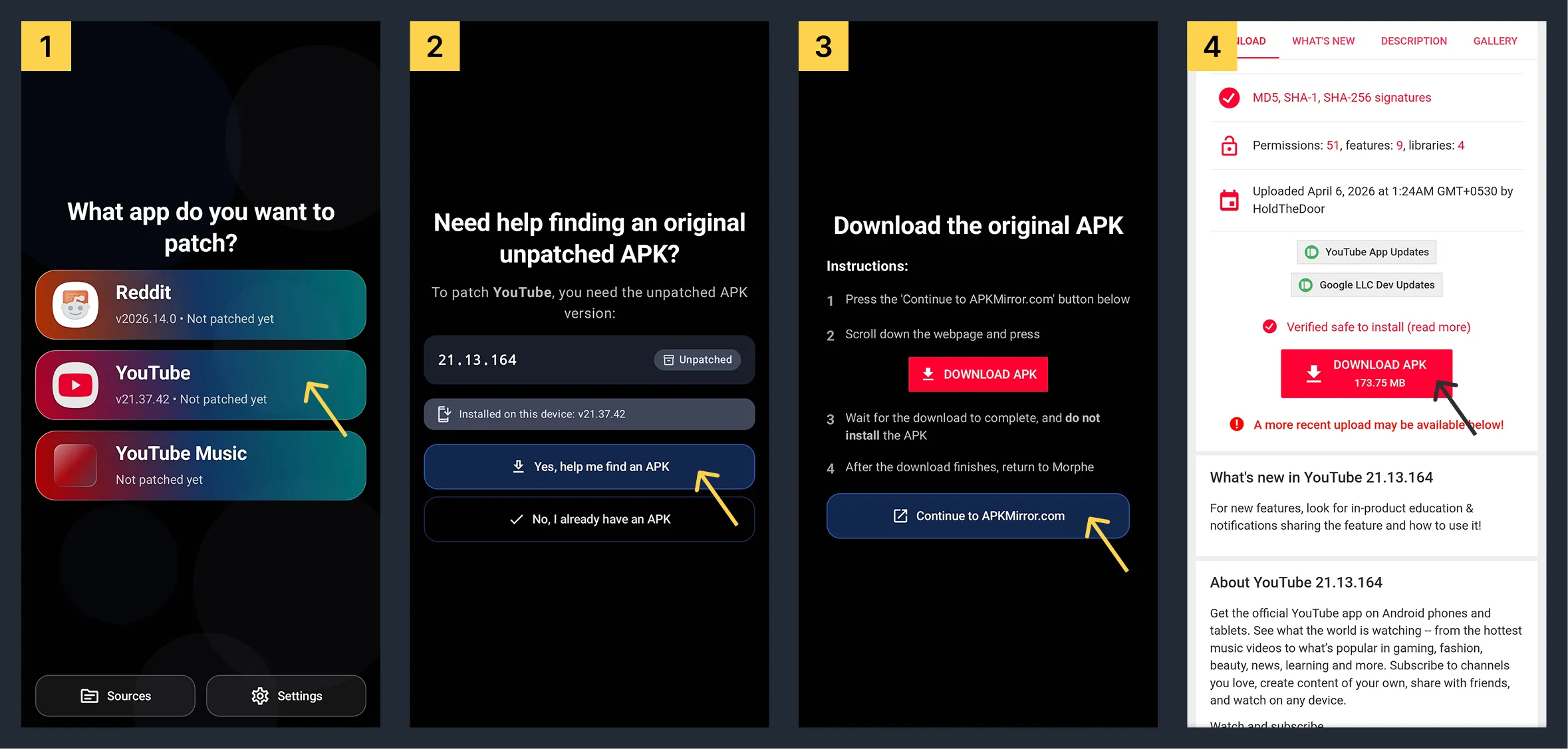
Next, we download the official YouTube setup file from APKMirror. Morphe Manager has a built-in helper so you get the exact recommended version without any guesswork.
- Open Morphe Manager and select YouTube from the list of applications.
- On the next screen, tap the “Yes, help me find an APK” button, as we will be patching this specific recommended version.
- Tap the “Continue to APKMirror.com” button. This opens the APKMirror website directly to the recommended version page so you don’t have to spend time searching for it. (Don’t worry, APKMirror is a safe, reputable platform hosting verified Android APKs.)
- Tap the “Download APK” button on the page to download the official YouTube APK file to your device so we can begin patching.
⚠️ Quick Tip for APKMirror:
Avoid clicking third-party ad banners that say “Download”. Tap the official grey or black Download APK button. Once the download finishes, leave the file in yourDownloadsfolder. You don’t need to open it yet.
Step 3: Patch the Downloaded YouTube APK File Inside Morphe App
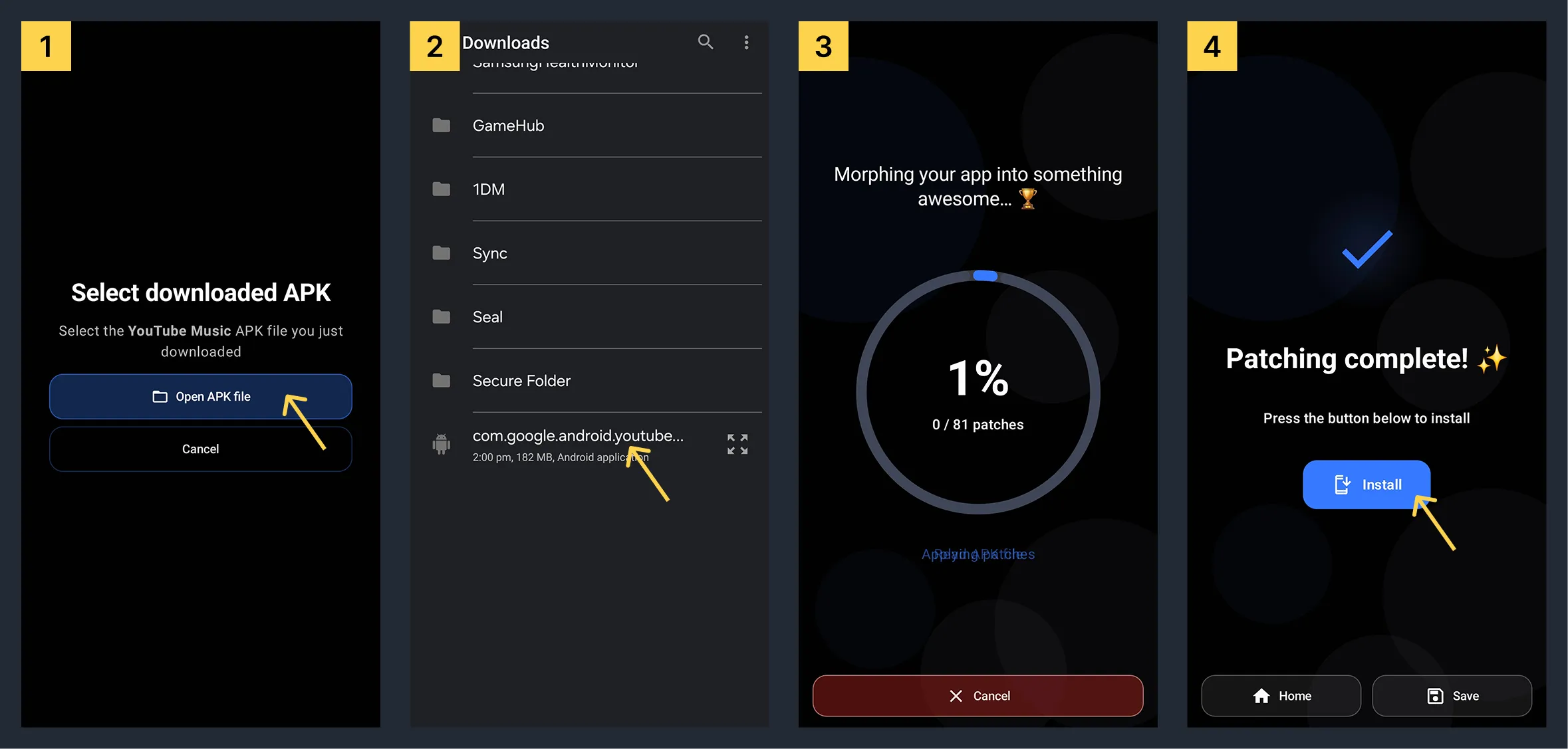
Now we let Morphe modify the YouTube APK to remove ads and add background playback.
- Once the APK finishes downloading in your browser, switch back to Morphe Manager. You will see the “Select Downloaded APK” screen.
- Tap the “Open APK file” button to open the Android file picker. It should open your Downloads folder by default. (If not, navigate to your download folder and select the YouTube APK you just downloaded.)
- After selecting the APK file, Morphe will display the patching screen showing real-time progress as the YouTube APK is patched. Wait a moment for it to complete.
- When the progress bar reaches 100%, the official YouTube APK is fully patched! You will now see an Install button.
Step 4: Install the Patched YouTube App on Your Phone
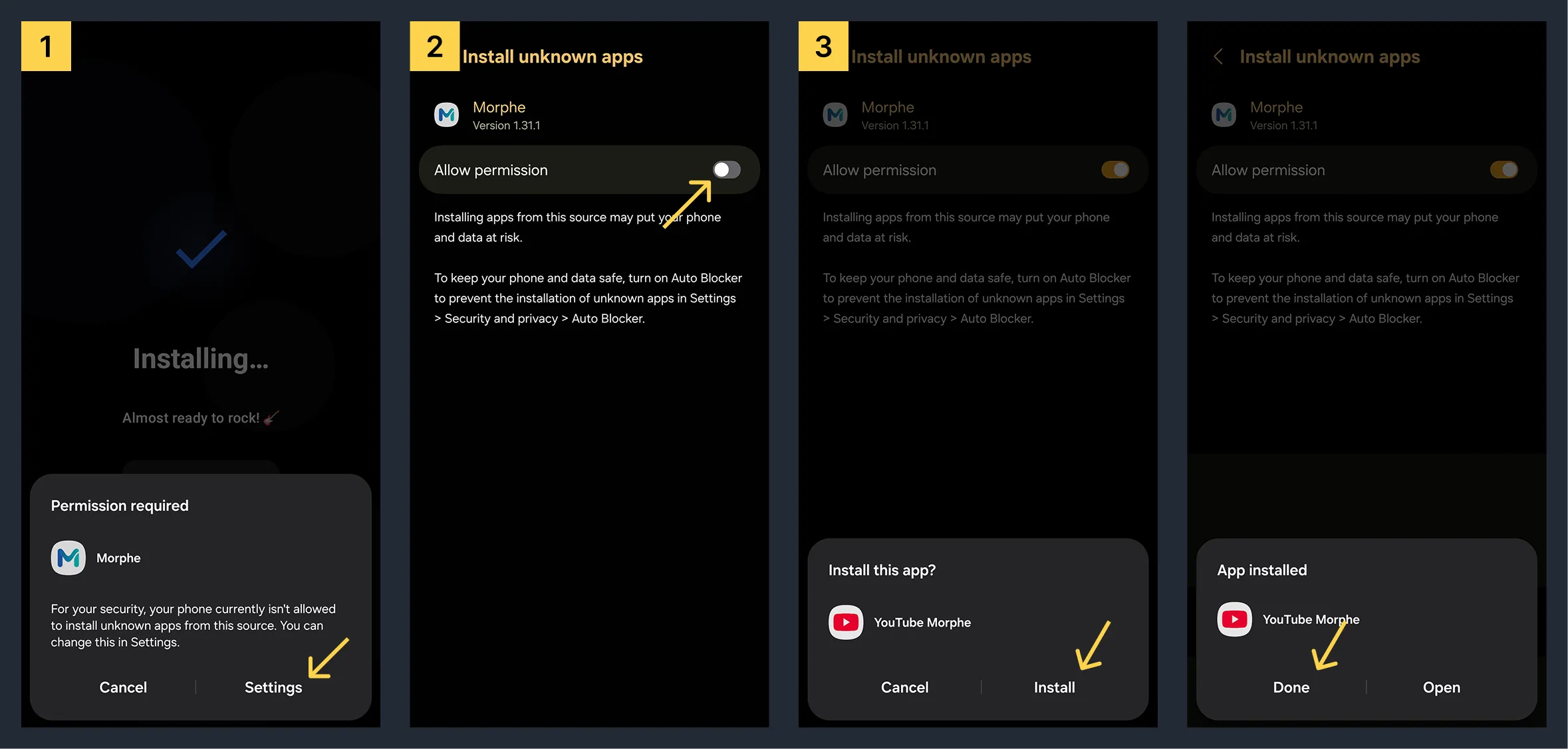
- Tap the Install button.
- You will see a “Permission Required” pop-up asking for permission to let Morphe install APK files. Tap the Settings button to go to Android’s permission screen.
- On the permission screen, enable the “Allow permission” (or “Allow from this source”) toggle, then head back to the app.
- A prompt will appear asking to “Install this app” for YouTube Morphe. Tap Install.
- Once installed successfully, tap “Done”.
- When you return to the Morphe app, you will see a screen asking to enable notifications for future patched app updates. Tap Allow. Next, on the Quick feature tour screen, you can tap Skip (or explore it if you’d like a walkthrough of the features).
Step 5: Install MicroG-RE and Add Your Google Account
- Open the newly installed YouTube Morphe app. A pop-up will prompt you to add an account and redirect you to morphe.software/microg in your browser to download the MicroG-RE APK file.
- Download and install the MicroG-RE app using its APK file the same way you installed the YouTube app earlier (tap the downloaded file and allow installation if prompted).
- Switch back to the YouTube Morphe app to add your Google account. The MicroG-RE sign-in screen will appear. Enter your Google email address and password to sign in.
- Once signed in, all your subscriptions, playlists, and watch history will load automatically, and you can enjoy the full ad-free YouTube experience right out of the box!
Step 6: Morphe Settings, Customizations, and Extra Features
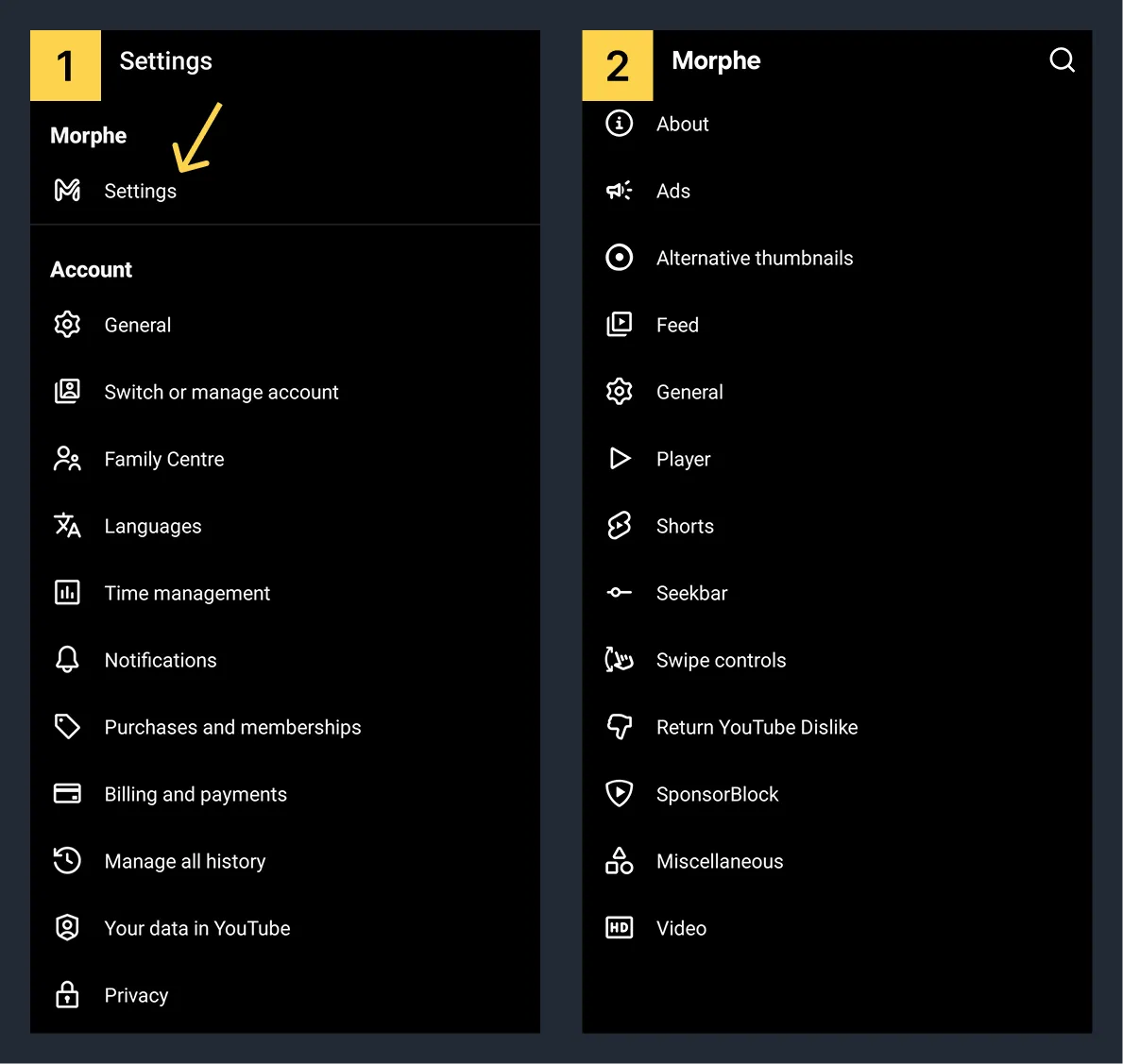
Ad-free playback and background play work immediately out of the box. If you want to explore extra tweaks:
- Tap your Profile Picture in the bottom navigation bar.
- Tap the Settings icon (gear) at the top right.
- Look for the Morphe section and tap Settings.
- From here, you can explore and toggle all available Morphe tweaks:
- Auto-Skip Sponsor Segments: Go to
SponsorBlock, turn it on, and set Sponsor to Automatically Skip. - Return Dislike Counts: Go to
Return YouTube Dislikeand turn it on. - Pure AMOLED Black Theme: Go to
Themeand turn on AMOLED Black for true pitch-black backgrounds. - Hide YouTube Shorts: Go to
General > Navigation buttonsand turn on Hide Shorts button.
- Auto-Skip Sponsor Segments: Go to
💡 Alternative Official Guide:
If you would like to check out the alternative official patching guide provided directly by the Morphe team, you can view the Official Morphe Simple Mode Patching Guide on GitHub.
How to Update Morphe YouTube in the Future
Every few months, Google tweaks YouTube’s backend, or Morphe releases new features. When you see an “Update” badge in Morphe Manager:
- Open Morphe Manager.
- Check the new patch details and the suggested YouTube version.
- Download the new clean APK from APKMirror.
- Hit Patch and tap Install.
- It updates right over your existing installation. All your settings, logins, and downloads stay completely intact.
My Pro Tip: Keep Both YouTube Apps on Your Phone
Don’t uninstall or disable the original YouTube app. Keeping both apps side by side gives you the best setup:
- Backup: If Google tweaks its backend and causes temporary buffering or playback issues in Morphe, you can open the official app and finish watching immediately.
- Latest Features: The Play Store version updates automatically, so you always have access to Google’s newest official features and UI tests.
Use Morphe YouTube as your daily ad-free player, and keep the stock app as a zero-hassle backup. Just remember to turn off notifications for the original YouTube app in your phone’s Settings so you don’t get duplicate alerts from both apps.
The Wrap-Up
Once you have Morphe set up, going back to regular YouTube feels impossible. It is fast, private, and gives you back control over your viewing experience.
If you ever run into any issues during setup or playback, you don’t have to figure it out alone:
- Check the official Morphe FAQ & Troubleshooting Guide for quick solutions to playback and account questions.
- Reach out to the helpful Reddit community over at r/MorpheApp, where active users and contributors help troubleshoot device-specific issues.
- Interested in patching other apps like Reddit or YouTube Music? Check out the community guide on How to Patch More Apps with Morphe.
Set it up on your phone, enjoy uninterrupted video playback, and experience YouTube the way it was meant to be.
Important Links
Here is a quick reference list of all the official links and resources mentioned in this guide:
- Official Morphe Website: morphe.software
- Morphe Manager Documentation: Morphe Manager Docs on GitHub
- Official Illustrated Patching Guide (with Images): Morphe Simple Mode Guide
- Morphe Manager Releases: GitHub Releases
- MicroG-RE Official Download: morphe.software/microg
- MicroG-RE GitHub Releases: MicroG-RE on GitHub
- Clean YouTube APKs: APKMirror
- Official FAQ & Troubleshooting: morphe.software/faq
- Community Support: r/MorpheApp on Reddit
- Guide to Patching Other Apps: How to Patch More Apps with Morphe
Quick answers
Will Morphe damage my phone or void my warranty?
No. Morphe runs as a normal Android app without rooting your device or touching system files. It cannot damage your hardware, alter system firmware, or void your warranty. If you ever change your mind, you can uninstall it in seconds like any regular app.
Will using Morphe or MicroG-RE ban my Google account?
In short: no. Neither Vanced, ReVanced, nor Morphe has ever caused a wave of Google account bans for normal video watching. Because MicroG-RE acts as a clean translation layer between the modified app and Google’s servers, Google sees your video stream requests as standard traffic. However, if you are paranoid, you can always create a secondary Google account just for YouTube viewing.
Why does Android warn me that 'File might be harmful'?
Whenever you download an APK file using a web browser instead of the Google Play Store, Android shows this warning by default. It does not mean the file has a virus; it simply means Android doesn't recognize the source through Google’s billing ecosystem. As long as you download Morphe and MicroG from their official website (morphe.software) and GitHub repositories, the files are clean and open-source.
Can Morphe patch other apps besides YouTube?
Yes. YouTube is just the most popular. Morphe can also patch apps like YouTube Music, Reddit, Twitter/X, and TikTok. You can explore all supported apps inside Morphe Manager, or check out community guides on Reddit (r/MorpheApp).
Why can't I just download a pre-patched YouTube APK from Google?
Never download pre-modified APKs from random websites. When someone else modifies and uploads an APK, you have no way of knowing what spyware or malicious code was slipped inside. Morphe is safe because you don't download someone else's file. You download the untouched, official YouTube app yourself and patch it locally on your own phone using open-source code. No shady middlemen, no mystery code.
Is Morphe available for iPhone (iOS) or Smart TVs?
Morphe is designed specifically for Android because Android allows local bytecode patching and sideloading. It does not work on iOS (for iPhones, look into sideloading uYouEnhanced via AltStore or TrollStore). If your Smart TV runs Android TV or Google TV, you can technically use Morphe, but an open-source app called SmartTube is far better suited for remote-control navigation on TVs.
How is Morphe different from Vanced and ReVanced, and why choose Morphe?
Vanced was shut down permanently in 2022 after Google issued a legal cease-and-desist. ReVanced replaced it, but its setup is often clunky and updates can lag due to contributor drama. Morphe was built by former ReVanced contributors to fix those exact headaches. It uses the same safe patching method, but gives you a cleaner interface, faster patch updates when YouTube breaks, and an effortless setup. All the features, zero drama.
Can I patch the latest version of YouTube?
Not always immediately. Google updates YouTube frequently, and brand-new versions can break existing patches. Always look for the 'Suggested Version' displayed inside Morphe Manager and download that exact APK from APKMirror. This ensures every patch works reliably without crashing.
Do I need to uninstall my original YouTube app?
No. The modified YouTube app uses a distinct digital signature, so it installs alongside your original YouTube app without causing conflicts. You can keep both installed, or disable the factory YouTube app in your phone's settings if you prefer not to see duplicate icons.
Can I download videos to my phone's gallery?
Morphe focuses on ad blocking and playback rather than video downloading, but it integrates directly with external open-source download tools like NewPipe or Seal. You can configure Morphe settings to display an external download button under videos for one-tap downloading.
Did this land? Tap a reaction.
😼 Billa Alert!
Take back your sleep routine. Schedule phone switch-off with Nightcap on Android.
Read post →