Stop late-night screen addiction! Nightcap app automatically switches off your phone
App timers are useless.
You set a 30-minute screen limit on Instagram or YouTube, the popup appears at 11:45 PM, you tap “Ignore limit for today”, and suddenly it’s 1:30 AM with burning eyes and a 6:00 AM alarm waiting.
If you’ve been struggling with late-night screen addiction or midnight doomscrolling, you already know the problem. Digital wellbeing tools (grayscale filters, DND modes, app blockers, Screen Time limits) fail at night for one simple reason. They are too easy to override. When your brain is exhausted after a long day, willpower doesn’t exist.
That’s why I built Nightcap.
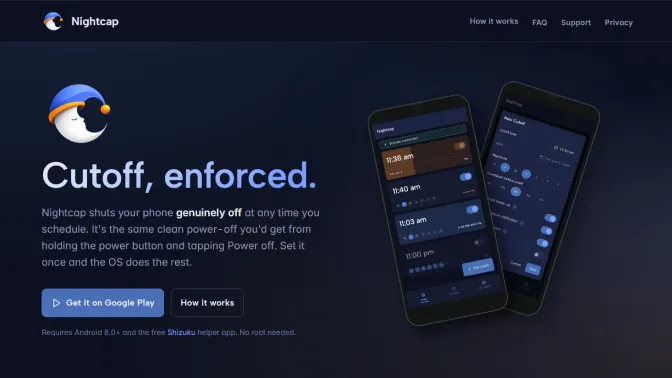
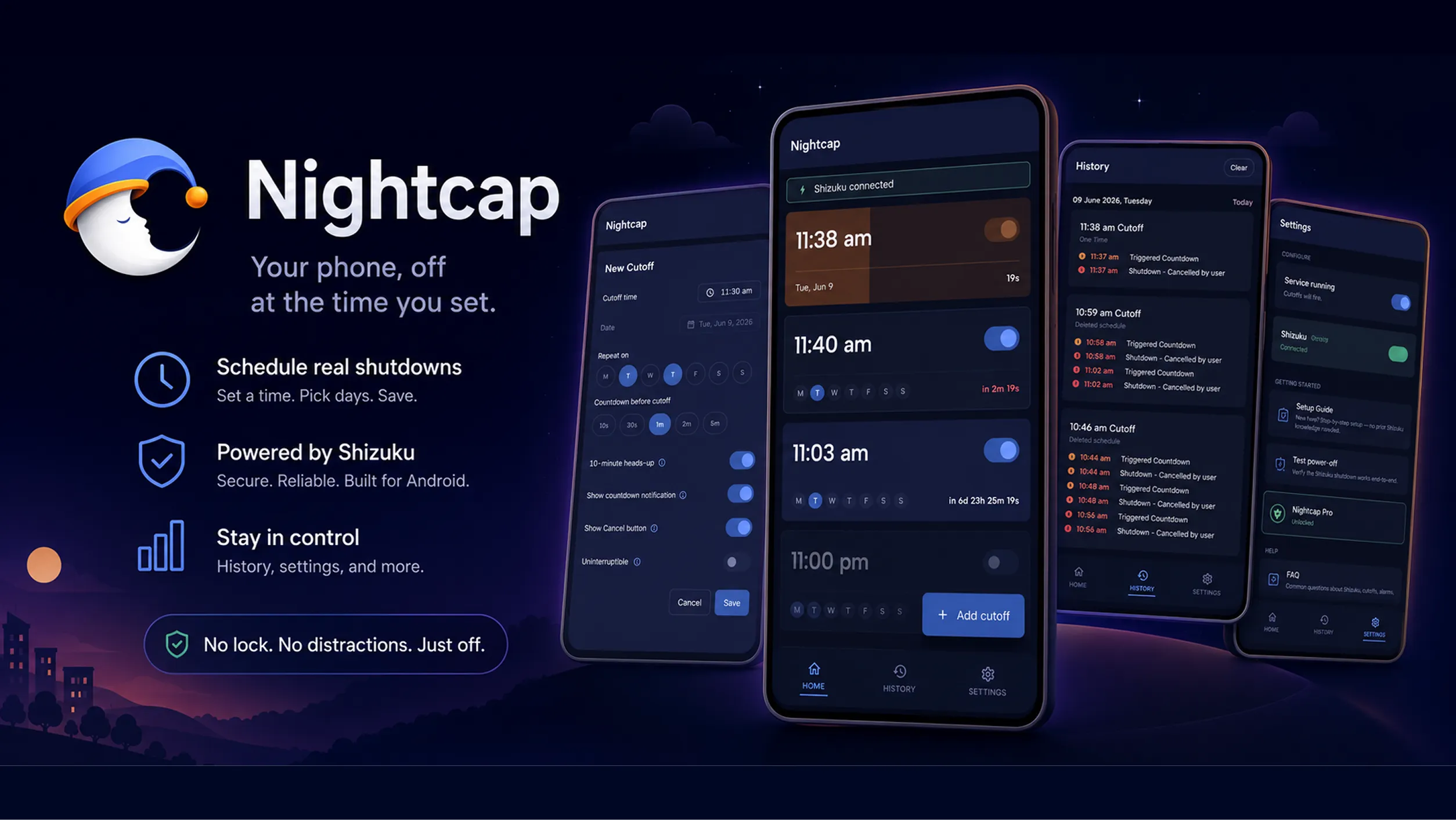
Nightcap is an automatic scheduled power-off app for Android. It doesn’t lock apps or show soft warnings. It shuts your phone completely off.
Not screen-lock off. A real, full OS power-down.
Why Physical Friction Beats Willpower for Better Sleep
When an app timer or screen lock pops up, bypassing it takes one lazy tap. Your brain knows there is zero penalty for cheating.
With Nightcap, here is what happens when your scheduled 11:00 PM cutoff hits:
- The screen goes black.
- Your phone shuts down completely.
- If you want to keep scrolling, you have to physically hold the power button, wait 45 seconds through the Android boot logo, enter your PIN, and unlock the device.
That 45-second reboot wait is the magic. It breaks the autopilot trance. Most nights, standing next to your bed waiting for a phone to boot feels so ridiculous that you just drop it on the nightstand and fall asleep. Physical reboot friction restores your sleep hygiene when willpower fails.
Who Nightcap Is Useful For
Nightcap doesn’t force a specific schedule on you. You decide when your phone needs to be off. Here are a few common ways people use it:
- Bedtime Cutoff (11:00 PM Mon to Fri): The late-night doomscroll loses because the phone simply isn’t powered on.
- Deep-Work Focus Blocks (10:00 AM Weekdays): Schedule a 2-hour automatic shutdown during peak productivity hours so you don’t pick up your phone to check notifications.
- Study & Exam Prep: Set a one-time cutoff before a study session. The phone goes off, and there is no swipe-up screen limit to bypass.
- Dinner & Family Time (7:00 PM Weeknights): Turn your phone off during dinner hours so you’re actually present with family.
- Gym & Workout Sessions: A 45-minute one-time cutoff so you train instead of scrolling social media between sets.
- Weekend Digital Detox: Schedule a cutoff Saturday morning at 9:00 AM to unplug for the weekend until you actively choose to turn your phone back on.
- Emergency Battery Saving: One-time cutoff at midnight if you’re heading out without a charger, letting your phone shut down cleanly before it drains completely.
Features Built for Real Routines
Nightcap keeps things simple, but includes controls for real life:
- Flexible Schedules: Set 11:00 PM Mon to Fri for bedtime, or a 10:00 AM weekday deep-work focus block. One-time or repeating.
- 10-Minute Warning: A gentle heads-up notification 10 minutes before cutoff so you can wrap up a text or set your morning alarm.
- Live Countdown: A persistent notification ticks down the final seconds with a Cancel button if you’re actually finishing something important.
- Uninterruptible Mode: For nights when you know your future self will try to cheat. Once armed, the cutoff can’t be edited or cancelled while running.
- Master Kill-Switch: Traveling across timezones or sick at home? One toggle in Settings pauses all schedules instantly.
- Local History Log: Track every cutoff (completed, cancelled, or triggered), saved strictly on your device.
Why Nightcap Needs Shizuku (and It is Safe!)
Standard Android security rules don’t let regular apps turn your phone off. Only system apps or rooted devices have that power.
In the past, running an automatic scheduled shutdown meant rooting your phone (which voids your warranty, breaks banking apps, and weakens system security) or plugging your phone into a PC via USB every single day.
That’s why Nightcap uses Shizuku.
If you haven’t heard of Shizuku before, it is the gold-standard tool used by millions of Android power users and developers worldwide:
- 100% Open-Source & Transparent: Shizuku’s code is completely public on GitHub with over 28,000+ stars. There are no hidden backdoors or closed-source binaries.
- Uses Android’s Built-In Security: Shizuku doesn’t hack your phone. It leverages Android’s official ADB (Android Debug Bridge) framework via Wireless Debugging. Your device stays unrooted, your warranty stays intact, and banking apps keep working.
- You Stay in Total Control: Just like standard location or camera permissions, Shizuku shows an explicit prompt when Nightcap asks for access. You can grant or revoke permission anytime in one tap.
Pairing Shizuku takes two minutes directly on your phone, giving Nightcap the safe, system-level permission it needs to power your phone off on schedule.
Setup & Pairing
Nightcap works on Android 8.0+. If Wireless Debugging sounds technical, don’t worry: the app includes a detailed, step-by-step in-app Setup Guide to walk you through every tap, plus one-tap deep links for brand-specific battery settings on Samsung, Xiaomi, Redmi, POCO, OnePlus, Oppo, Realme, Vivo, Motorola, Nothing, and Google Pixel devices:
- Open Shizuku and pair via Wireless Debugging (takes 2 minutes on-device, no PC needed).
- Open Nightcap and tap Connect Shizuku.
- Pick your bedtime, choose your days, and tap save.
Privacy & Data Safety
Nightcap has zero servers, zero analytics, zero trackers, and zero user accounts. Everything stays inside the app’s private storage on your phone. We don’t even run a backend.
Pro Tip: The Ultimate Anti-Addiction Setup
If you know your future self is a master at talking you into “just 5 more minutes”, here is the bulletproof setup to prevent canceling your cutoffs:
- Set a weekly repeat schedule for your preferred bedtime (e.g., 11:00 PM Monday to Friday).
- Set countdown notification duration to 1 second so the cutoff fires almost instantly without giving you time to hesitate.
- Toggle OFF “10-minute heads-up” so there’s no early warning to disarm it.
- Toggle OFF “Show cancel button” to remove the exit hatch from the notification.
- Toggle ON “Uninterruptible mode” so armed cutoffs can’t be edited or cancelled while running.
Once saved, your cutoff is locked in. When bedtime hits, your phone powers off with zero room for negotiations.
Download Nightcap
If late-night scrolling keeps ruining your mornings, give it a shot. You can get Nightcap on Google Play or read more on the official Nightcap website.
Quick answers
Does Nightcap require rooting my Android phone?
No. Nightcap pairs with Shizuku, a free open-source tool that uses Android Wireless Debugging on your phone. No root or computer required.
Which Android phone brands are supported?
Nightcap works on Android 8.0+ across all major brands including Samsung, Xiaomi, Redmi, POCO, OnePlus, Oppo, Realme, Vivo, Motorola, Nothing, and Google Pixel.
What happens if I need to use my phone right before a cutoff?
Nightcap gives you a 10-minute heads-up notification and displays a live countdown timer, letting you tap Cancel anytime before it fires.
Does the app track my data or require an account?
Zero servers, zero analytics, zero user accounts. All your schedules and logs stay 100% local on your phone.
Did this land? Tap a reaction.
😼 Billa Alert!
Take back your sleep routine. Schedule phone switch-off with Nightcap on Android.
Read post →